
WhiteWhale and Clay are not the same kind of tool, and most teams that evaluate them end up using both. WhiteWhale finds the “why now,” the verified buying signal with a source your rep can reference on a call. Clay finds the “who,” the right contact at the account, enriched with verified email and phone through a multi-provider waterfall. WhiteWhale detects the signal. Clay acts on it.
This guide breaks down what each tool actually does, where they overlap, where they differ, and how they work together.
Feature | Clay | |
|---|---|---|
What it is | Custom buying signal detection platform | Data orchestration and enrichment platform |
Core job | Find verified buying signals with sources attached | Build custom data workflows, enrich contacts, run outbound |
Signal definition | Plain English (up to 35 custom signals) | Custom table logic with 150+ data providers + Claygent AI |
Signal sources | SEC filings (10-K, 10-Q, 8-K, Form D), earnings call transcripts, job postings from company ATS, 8,000+ news feeds, press releases, company websites | 150+ data providers, web scrapers, Claygent AI research agent, job change tracking, web intent (Growth tier+) |
Signal verification | Every signal includes linked source, direct quotes, cited facts | Depends on the data provider used; quality varies by source |
Contact enrichment | No contact data included | Waterfall enrichment across dozens of providers; verified email and phone |
Outbound sequencing | No native sequencing | Clay sequencer (Launch tier+); integrations with Outreach, Salesloft, etc. |
CRM integration | HubSpot, Salesforce, plus any HTTP API (Growth tier+) | |
Notification delivery | Slack, Microsoft Teams, email digest | Webhook, Slack (via integration), CRM sync |
AI capabilities | AI scans unstructured sources (earnings calls, SEC filings, news) to match plain-English signals | Claygent AI research agent; AI-powered enrichment and scoring |
Learning curve | Low; write signals in plain English, results appear in Slack | High; requires technical RevOps to build and maintain table workflows |
Setup time | Days; most teams live in under a week | Days to weeks; depends on workflow complexity |
Pricing | Plans from $200/mo, month-to-month, no annual contract, unlimited users | Free tier (6K actions/yr), Launch $167/mo, Growth $446/mo, plus data credits on top |
Contract | Month-to-month, cancel anytime | Monthly or annual billing available |
G2 rating | 5.0/5 | 4.9/5 |
What WhiteWhale does that Clay does not
Source-verified signal detection from primary sources
WhiteWhale monitors SEC filings, earnings call transcripts, job postings pulled directly from company ATS systems (Greenhouse, Lever, Workday, Ashby), 8,000+ news feeds, press releases, and company websites. When a signal fires, the result includes a link to the original source, direct quotes pulled from the source, and cited facts.
This matters because your rep can open the source, read the actual filing or transcript, and reference it on a call: “Your CFO mentioned on the Q3 earnings call that you’re investing $15M in automation across three facilities.” That level of specificity is not possible with Clay’s data providers, which return structured data fields (company size, funding amount, job title) rather than unstructured source material with quotes.
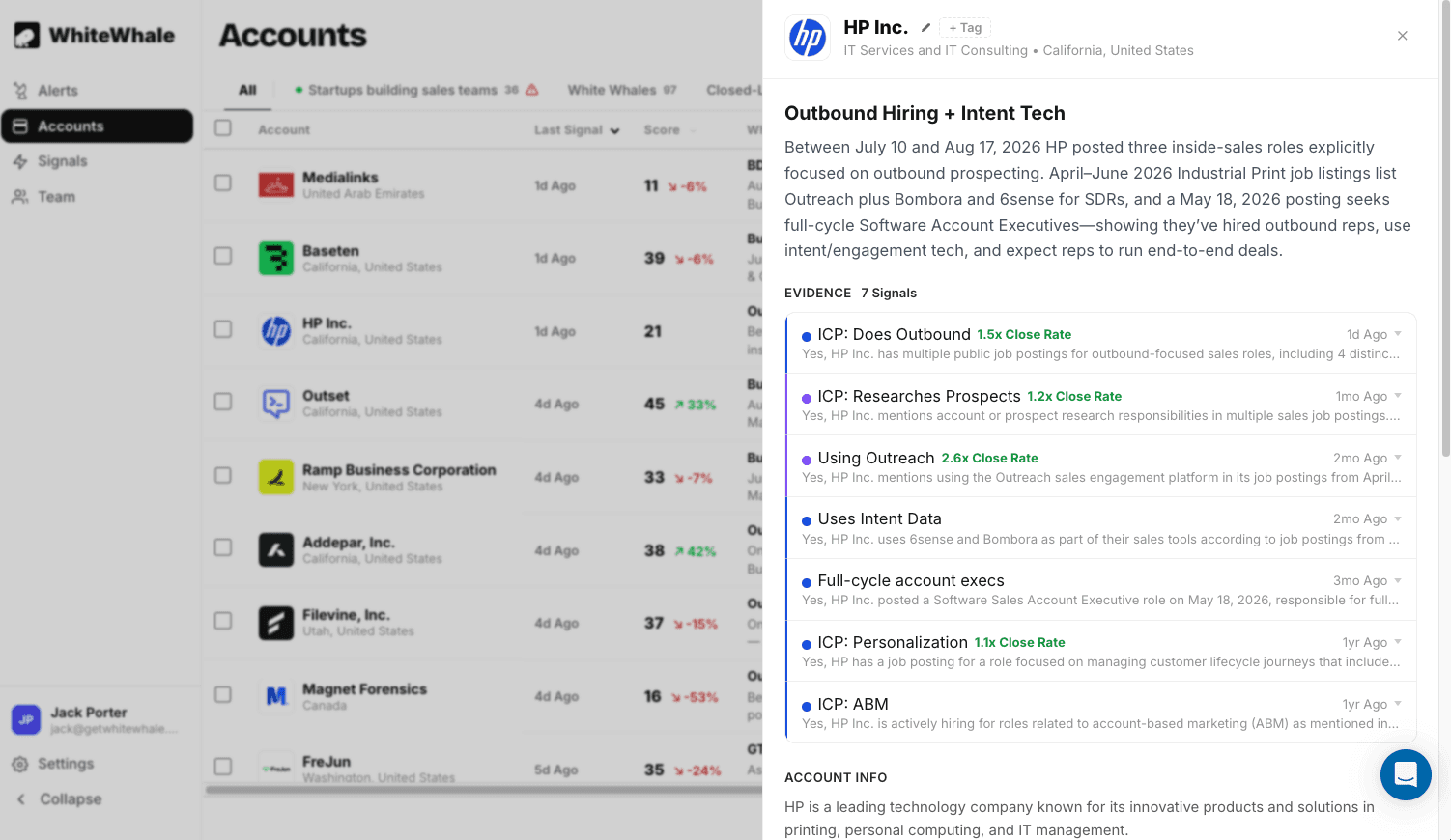
You don’t need a PHD to setup signals.
In WhiteWhale, you write a signal like: “Did {account}’s CEO publicly commit to AI adoption on an earnings call?” or “Is {account} posting jobs that mention migrating off Salesforce?” The system handles the rest. No table logic, no waterfall configuration, no data provider selection, no credit management.
In Clay, building a comparable signal detection workflow requires: setting up a table, connecting the right data providers, configuring Claygent to research specific triggers, writing prompts for the AI agent, building conditional logic for scoring, and managing credit consumption across providers. This is powerful for teams with a dedicated GTM engineer. It is inaccessible for teams without one.
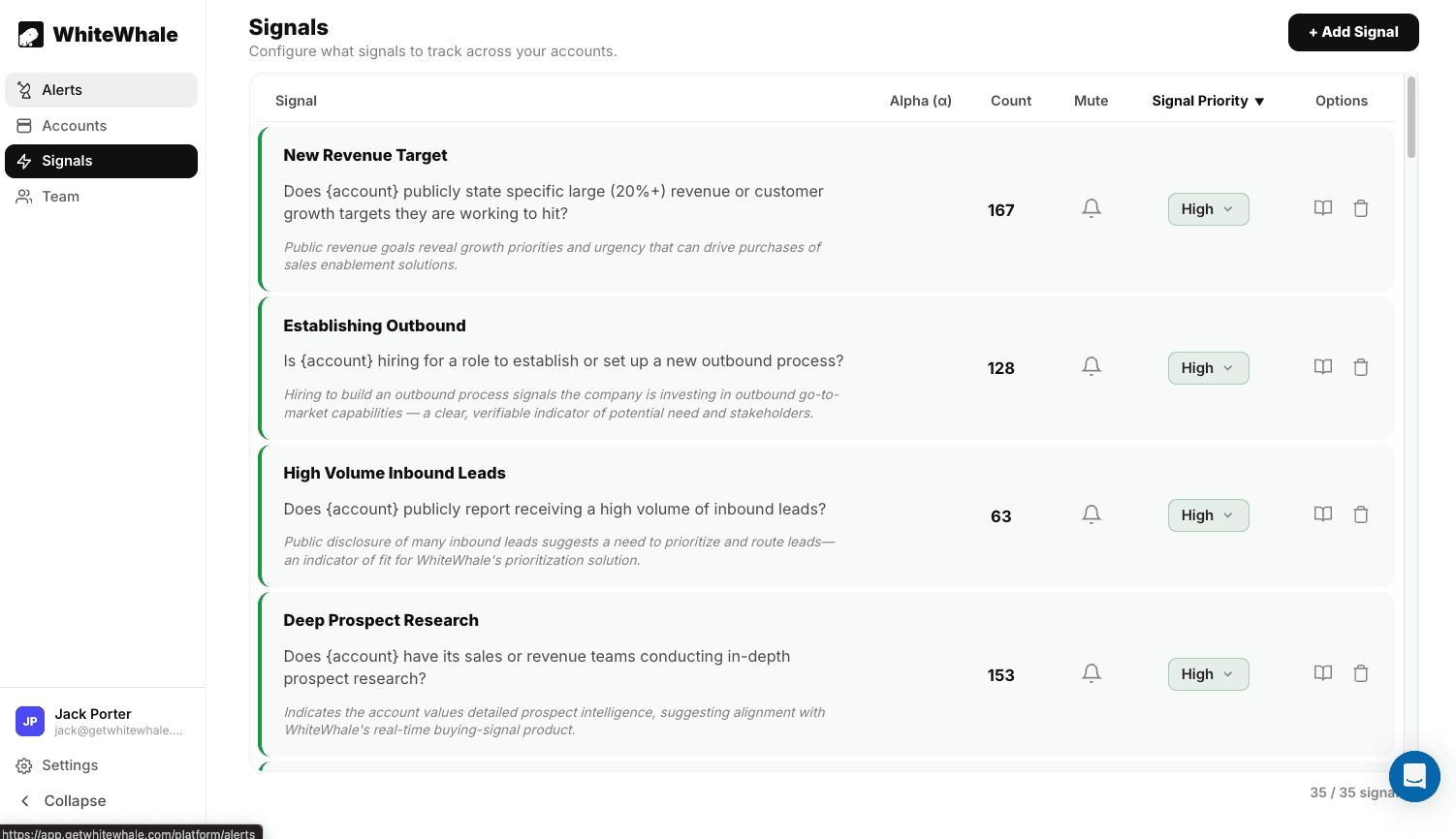
Earnings call and SEC filing coverage
WhiteWhale is one of the only platforms that systematically monitors quarterly earnings call transcripts and SEC filings as signal sources. When a CEO commits to a strategic initiative on an earnings call, that commitment carries board-approved budget. When a company files a Form D with the SEC, a new fund or investment vehicle has been created. These are signals that no Clay data provider currently offers as a structured input.
What Clay does that WhiteWhale does not
Contact enrichment through waterfall logic
Clay’s core strength is finding the right person at an account and getting their verified contact information. You build a waterfall that checks Provider A, then Provider B, then Provider C until it finds a verified email and phone number. This is something WhiteWhale intentionally does not do. WhiteWhale tells you which accounts are showing buying signals and why. Clay tells you who to contact at those accounts and how to reach them.
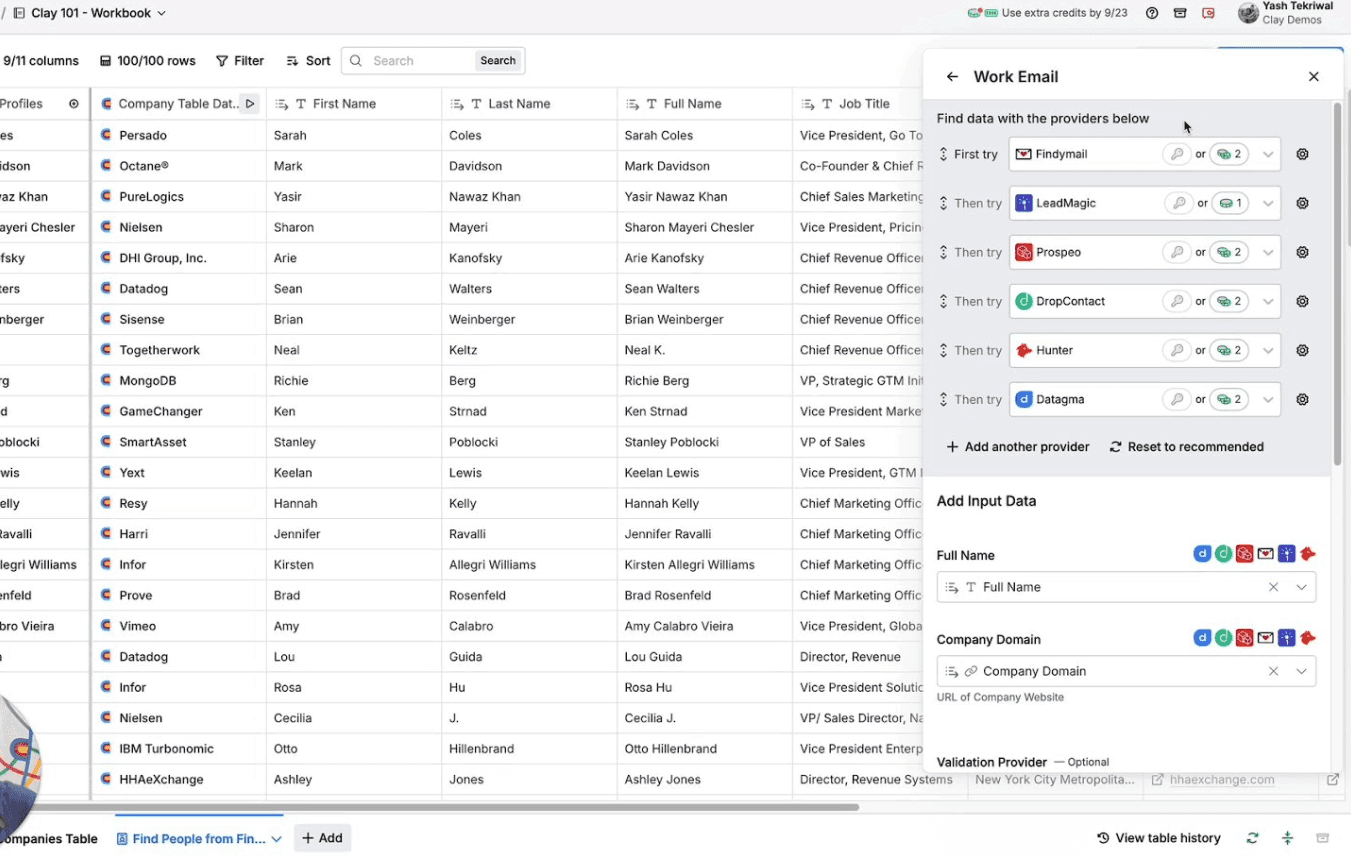
Outbound sequencing
Clay includes a built-in email sequencer (Launch tier and above) and integrates with Outreach, Salesloft, and other engagement platforms. You can go from “account identified” to “email sent” inside Clay without switching tools. WhiteWhale does not send emails. It delivers signals to Slack, HubSpot, or Salesforce, and your team takes it from there.
Flexible data orchestration
Clay connects to 150+ data providers and lets you build any data workflow you can imagine. Need to cross-reference Crunchbase funding data with BuiltWith technographics and LinkedIn job changes, then score the result with an AI prompt and push it to Salesforce? Clay does that. WhiteWhale is a focused signal detection tool, not a general-purpose data platform.
Where they overlap
Both tools can detect certain types of buying signals, but they approach it differently.
Hiring signals
Clay tracks job changes through its data providers and can detect hiring surges by monitoring LinkedIn activity. WhiteWhale tracks job postings pulled directly from company ATS systems (Greenhouse, Lever, Workday, Ashby), which gives you the actual job description with specific requirements, technologies mentioned, and seniority level. The difference: Clay tells you “this person changed jobs.” WhiteWhale tells you “this company posted a role requiring experience with SAP S/4HANA implementation,” which is a more specific buying signal.
Funding and company event signals
Clay accesses funding data through Crunchbase and other providers. WhiteWhale tracks funding through SEC Form D filings (filed within 15 days of closing) and news coverage. Both can alert you when a company raises a round. WhiteWhale’s SEC filing coverage catches private rounds that may not appear in Crunchbase immediately.
Custom signal logic
Clay lets you build custom signal logic by combining data providers, web scrapers, and Claygent AI prompts into conditional workflows. WhiteWhale lets you write custom signals in plain English and the system handles the detection. Clay offers more flexibility for technically-minded operators. WhiteWhale offers more simplicity for sales teams and managers who want results without building workflows.
How teams use WhiteWhale and Clay together
The most common setup among teams that use both:
WhiteWhale detects the signal. A custom signal fires: “Account X’s CFO discussed cost reduction on their Q3 earnings call, and they are hiring for roles mentioning ERP migration.” The alert appears in Slack with the sources linked.
Clay enriches the contact. The signal triggers a webhook to Clay. Clay runs a waterfall enrichment to find the VP of Operations or CTO at the account, returns a verified email and phone number, and pushes the enriched contact into a sequence or CRM.
The rep acts with context. The rep has the signal (what happened and why it matters), the contact (who to reach), and the evidence (the source link and quote to reference in outreach). The entire workflow runs automatically from signal detection to enriched contact, with the rep only stepping in to personalize and send.
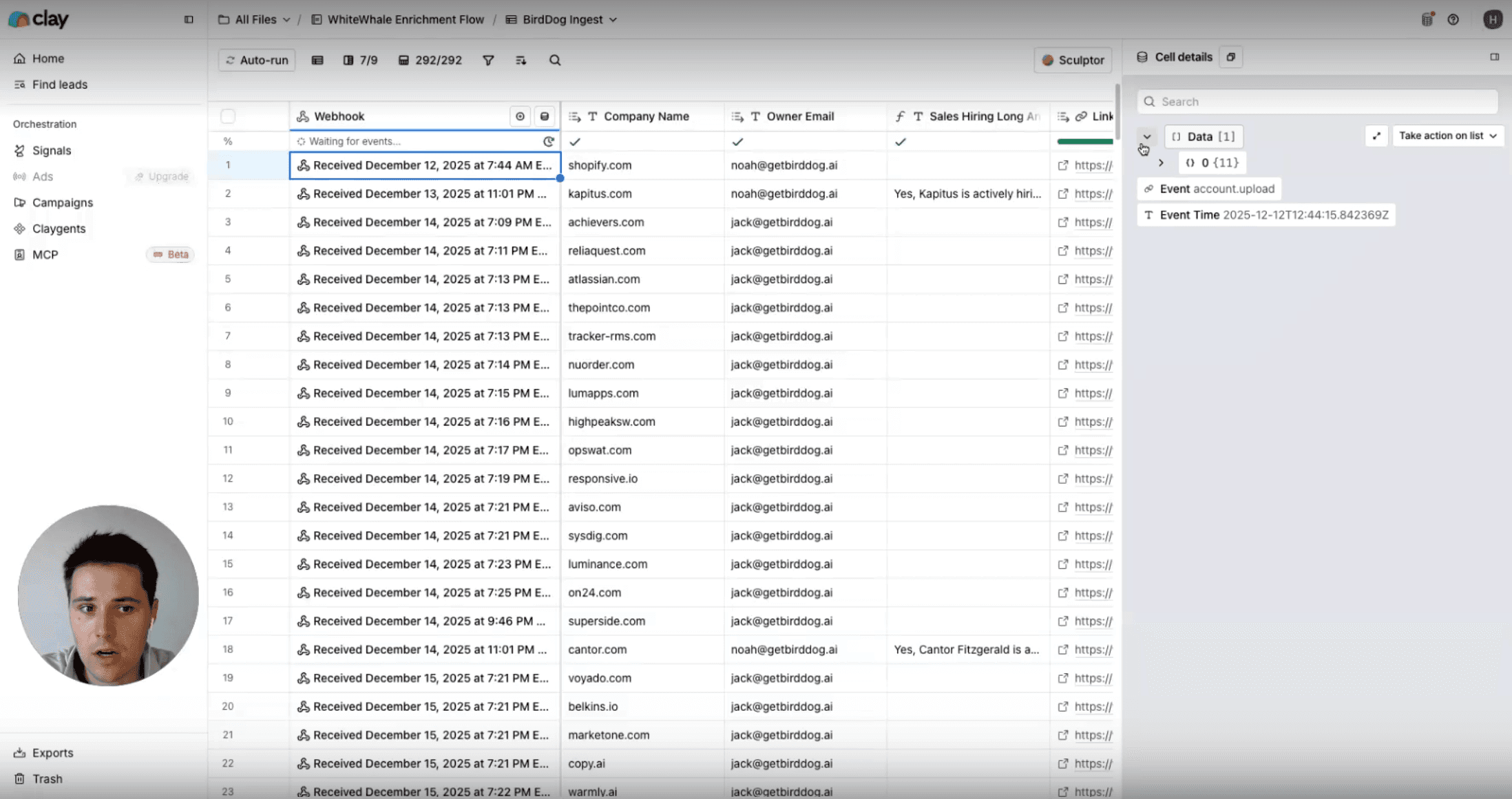
This is why the two tools are complementary rather than competitive. WhiteWhale answers “why should I reach out to this account right now?” Clay answers “who should I reach out to and how do I contact them?”
For teams that do not use Clay, WhiteWhale integrates directly with HubSpot, Salesforce, Slack, Microsoft Teams, and any AI agent via MCP or API. 90% of WhiteWhale customers never log into the platform. Everything flows into their existing workflow.
Pricing comparison
WhiteWhale pricing
Plans start at $200/month. Month-to-month, no annual contract. Unlimited users. No per-seat pricing. Pricing scales linearly with accounts monitored:
Accounts monitored | Monthly price |
|---|---|
300 | $200 |
750 | $500 |
1,500 | $1,000 |
Custom | Custom |
You can see what signals WhiteWhale finds for your accounts before committing to a plan. See pricing.
Clay pricing
Clay uses a tiered subscription plus credit-based pricing. The subscription gives you a base number of actions and data credits per year. Additional credits cost extra depending on the data provider.
Plan | Monthly price | Actions/year | Data credits/year | Key features |
|---|---|---|---|---|
Free | $0 | 6,000 | 1,200 | Unlimited tables, Claygent, multi-provider waterfalls, 200 rows per table |
Launch | $167/mo | 180,000 | 30,000 | Phone enrichment, job change tracking, email campaigns, integrations |
Growth | $446/mo | 480,000 | 72,000 | CRM auto-sync, data warehouse sync, any HTTP API, webhook automation |
Enterprise | Custom | Custom | Custom | SSO, RBAC, dedicated growth strategist |
The credit complexity. Clay’s pricing looks straightforward until you factor in credit consumption. Different data providers consume different numbers of credits per lookup. A waterfall enrichment that checks 4 providers for one contact might consume 8 to 15 credits depending on which providers you use. Teams running high-volume enrichment can burn through credits faster than expected. Published contract data shows a median annual spend of approximately $30,000 for Clay.
The practical comparison. WhiteWhale at $200/month ($2,400/year) gives you signal detection for 300 accounts with unlimited users. Clay at $167/month ($2,004/year on the Launch plan) gives you enrichment and workflow orchestration. Running both costs roughly $4,400/year for a team that needs custom signals plus contact enrichment, which is less than a single Bombora contract ($25K+) or a 6sense license (median $62,820/yr).
When to choose WhiteWhale only
Your team needs custom buying signals but already has contact data in your CRM or through another enrichment tool
You sell to industries where the signals live in SEC filings, earnings calls, and job postings: manufacturing, financial services, healthcare, logistics, cybersecurity
You want source-verified signals your reps can reference on calls, not data points for a scoring model
You do not have a GTM engineer and need something live in days, not weeks
You want month-to-month pricing with no credit complexity
When to choose Clay only
Your primary need is contact enrichment through multi-provider waterfalls, not signal detection
You have a dedicated GTM engineer or RevOps person who can build and maintain custom workflows
You need outbound sequencing built into your data platform
Your signals come from structured data sources (job changes, funding rounds, technographic shifts) that Clay’s 150+ providers already cover
You enjoy building data workflows and want maximum flexibility over simplicity
When to use both
You need custom signals from unstructured sources (earnings calls, SEC filings, news) AND enriched contact data with verified email and phone
You want the full workflow automated: WhiteWhale detects the signal, Clay enriches the contact, the rep gets both in Slack or CRM
You sell to enterprise accounts where the “why now” context from a verified signal is what gets the meeting, and the enriched contact is what gets the email delivered
Accounts with 2 or more stacked signals close at 2.1x the baseline win rate. Pairing WhiteWhale’s signal detection with Clay’s enrichment gives your team both the timing and the reach to capitalize on those signals.
For a full comparison of all signal and intent platforms, see best buying signal platforms.
FAQ
Is WhiteWhale a competitor to Clay?
No. They serve different functions. WhiteWhale detects custom buying signals from unstructured sources (SEC filings, earnings calls, job postings, news) and delivers them with source verification. Clay orchestrates data from 150+ providers into enrichment workflows and outbound sequences. Most teams that use both run WhiteWhale for signal detection and Clay for contact enrichment and outreach execution. WhiteWhale integrates with Clay via webhook.
Can Clay track earnings calls and SEC filings like WhiteWhale?
Not natively. Clay connects to 150+ data providers that return structured data fields (company info, contact details, technographics, job changes). It does not monitor earnings call transcripts or SEC filings for custom triggers. You could potentially build a partial version using Claygent to research specific companies, but it would not systematically monitor your entire account list the way WhiteWhale does, and it would consume significant credits.
Which is easier to set up?
WhiteWhale is simpler. You write signals in plain English, connect Slack or your CRM, and signals start appearing. No table logic, no data provider configuration, no credit management. Clay is more powerful but requires technical setup. Most teams report a week or more before they are comfortable with Clay’s table logic and workflow builder.
How much does it cost to run both?
WhiteWhale starts at $200/month for 300 accounts. Clay’s Launch plan starts at $167/month. Running both costs roughly $367/month ($4,400/year), which is less than a single Bombora contract ($25K+/yr) or a 6sense license (median $62,820/yr per Vendr). See WhiteWhale pricing.
Does WhiteWhale have a free tier like Clay?
No. WhiteWhale does not have a free tier. You can see what signals WhiteWhale finds for your accounts before committing to a plan, but paid plans start at $200/month, month-to-month, no annual contract. Clay offers a free tier with 6,000 actions per year and 1,200 data credits.
Can WhiteWhale replace Clay?
No. WhiteWhale does not do contact enrichment, does not provide email or phone data, and does not do outbound sequencing. If your primary need is finding the right contact and getting their verified information, you need Clay or a similar enrichment tool. WhiteWhale replaces the signal detection layer, not the data enrichment layer.
Can Clay replace WhiteWhale?
Partially, for some signal types. Clay can detect job changes, funding rounds, and technographic shifts through its data providers. It cannot systematically monitor earnings calls, SEC filings, or 8,000+ news sources for custom plain-English triggers the way WhiteWhale does. For teams that need signals from unstructured public sources with verified evidence, Clay is not a substitute.
About the author
Jack Porter is Co-Founder of WhiteWhale, a buying signal platform for B2B sales teams. Since 2025, Jack has spoken with 1,875 sales, GTM, and marketing leaders about their technology stack, what signals actually drive pipeline, and where intent data falls short. Those conversations informed every recommendation on this page. He can be reached on LinkedIn.
WhiteWhale and Clay are not the same kind of tool, and most teams that evaluate them end up using both. WhiteWhale finds the “why now,” the verified buying signal with a source your rep can reference on a call. Clay finds the “who,” the right contact at the account, enriched with verified email and phone through a multi-provider waterfall. WhiteWhale detects the signal. Clay acts on it.
This guide breaks down what each tool actually does, where they overlap, where they differ, and how they work together.
Feature | Clay | |
|---|---|---|
What it is | Custom buying signal detection platform | Data orchestration and enrichment platform |
Core job | Find verified buying signals with sources attached | Build custom data workflows, enrich contacts, run outbound |
Signal definition | Plain English (up to 35 custom signals) | Custom table logic with 150+ data providers + Claygent AI |
Signal sources | SEC filings (10-K, 10-Q, 8-K, Form D), earnings call transcripts, job postings from company ATS, 8,000+ news feeds, press releases, company websites | 150+ data providers, web scrapers, Claygent AI research agent, job change tracking, web intent (Growth tier+) |
Signal verification | Every signal includes linked source, direct quotes, cited facts | Depends on the data provider used; quality varies by source |
Contact enrichment | No contact data included | Waterfall enrichment across dozens of providers; verified email and phone |
Outbound sequencing | No native sequencing | Clay sequencer (Launch tier+); integrations with Outreach, Salesloft, etc. |
CRM integration | HubSpot, Salesforce, plus any HTTP API (Growth tier+) | |
Notification delivery | Slack, Microsoft Teams, email digest | Webhook, Slack (via integration), CRM sync |
AI capabilities | AI scans unstructured sources (earnings calls, SEC filings, news) to match plain-English signals | Claygent AI research agent; AI-powered enrichment and scoring |
Learning curve | Low; write signals in plain English, results appear in Slack | High; requires technical RevOps to build and maintain table workflows |
Setup time | Days; most teams live in under a week | Days to weeks; depends on workflow complexity |
Pricing | Plans from $200/mo, month-to-month, no annual contract, unlimited users | Free tier (6K actions/yr), Launch $167/mo, Growth $446/mo, plus data credits on top |
Contract | Month-to-month, cancel anytime | Monthly or annual billing available |
G2 rating | 5.0/5 | 4.9/5 |
What WhiteWhale does that Clay does not
Source-verified signal detection from primary sources
WhiteWhale monitors SEC filings, earnings call transcripts, job postings pulled directly from company ATS systems (Greenhouse, Lever, Workday, Ashby), 8,000+ news feeds, press releases, and company websites. When a signal fires, the result includes a link to the original source, direct quotes pulled from the source, and cited facts.
This matters because your rep can open the source, read the actual filing or transcript, and reference it on a call: “Your CFO mentioned on the Q3 earnings call that you’re investing $15M in automation across three facilities.” That level of specificity is not possible with Clay’s data providers, which return structured data fields (company size, funding amount, job title) rather than unstructured source material with quotes.
You don’t need a PHD to setup signals.
In WhiteWhale, you write a signal like: “Did {account}’s CEO publicly commit to AI adoption on an earnings call?” or “Is {account} posting jobs that mention migrating off Salesforce?” The system handles the rest. No table logic, no waterfall configuration, no data provider selection, no credit management.
In Clay, building a comparable signal detection workflow requires: setting up a table, connecting the right data providers, configuring Claygent to research specific triggers, writing prompts for the AI agent, building conditional logic for scoring, and managing credit consumption across providers. This is powerful for teams with a dedicated GTM engineer. It is inaccessible for teams without one.
Earnings call and SEC filing coverage
WhiteWhale is one of the only platforms that systematically monitors quarterly earnings call transcripts and SEC filings as signal sources. When a CEO commits to a strategic initiative on an earnings call, that commitment carries board-approved budget. When a company files a Form D with the SEC, a new fund or investment vehicle has been created. These are signals that no Clay data provider currently offers as a structured input.
What Clay does that WhiteWhale does not
Contact enrichment through waterfall logic
Clay’s core strength is finding the right person at an account and getting their verified contact information. You build a waterfall that checks Provider A, then Provider B, then Provider C until it finds a verified email and phone number. This is something WhiteWhale intentionally does not do. WhiteWhale tells you which accounts are showing buying signals and why. Clay tells you who to contact at those accounts and how to reach them.
Outbound sequencing
Clay includes a built-in email sequencer (Launch tier and above) and integrates with Outreach, Salesloft, and other engagement platforms. You can go from “account identified” to “email sent” inside Clay without switching tools. WhiteWhale does not send emails. It delivers signals to Slack, HubSpot, or Salesforce, and your team takes it from there.
Flexible data orchestration
Clay connects to 150+ data providers and lets you build any data workflow you can imagine. Need to cross-reference Crunchbase funding data with BuiltWith technographics and LinkedIn job changes, then score the result with an AI prompt and push it to Salesforce? Clay does that. WhiteWhale is a focused signal detection tool, not a general-purpose data platform.
Where they overlap
Both tools can detect certain types of buying signals, but they approach it differently.
Hiring signals
Clay tracks job changes through its data providers and can detect hiring surges by monitoring LinkedIn activity. WhiteWhale tracks job postings pulled directly from company ATS systems (Greenhouse, Lever, Workday, Ashby), which gives you the actual job description with specific requirements, technologies mentioned, and seniority level. The difference: Clay tells you “this person changed jobs.” WhiteWhale tells you “this company posted a role requiring experience with SAP S/4HANA implementation,” which is a more specific buying signal.
Funding and company event signals
Clay accesses funding data through Crunchbase and other providers. WhiteWhale tracks funding through SEC Form D filings (filed within 15 days of closing) and news coverage. Both can alert you when a company raises a round. WhiteWhale’s SEC filing coverage catches private rounds that may not appear in Crunchbase immediately.
Custom signal logic
Clay lets you build custom signal logic by combining data providers, web scrapers, and Claygent AI prompts into conditional workflows. WhiteWhale lets you write custom signals in plain English and the system handles the detection. Clay offers more flexibility for technically-minded operators. WhiteWhale offers more simplicity for sales teams and managers who want results without building workflows.
How teams use WhiteWhale and Clay together
The most common setup among teams that use both:
WhiteWhale detects the signal. A custom signal fires: “Account X’s CFO discussed cost reduction on their Q3 earnings call, and they are hiring for roles mentioning ERP migration.” The alert appears in Slack with the sources linked.
Clay enriches the contact. The signal triggers a webhook to Clay. Clay runs a waterfall enrichment to find the VP of Operations or CTO at the account, returns a verified email and phone number, and pushes the enriched contact into a sequence or CRM.
The rep acts with context. The rep has the signal (what happened and why it matters), the contact (who to reach), and the evidence (the source link and quote to reference in outreach). The entire workflow runs automatically from signal detection to enriched contact, with the rep only stepping in to personalize and send.
This is why the two tools are complementary rather than competitive. WhiteWhale answers “why should I reach out to this account right now?” Clay answers “who should I reach out to and how do I contact them?”
For teams that do not use Clay, WhiteWhale integrates directly with HubSpot, Salesforce, Slack, Microsoft Teams, and any AI agent via MCP or API. 90% of WhiteWhale customers never log into the platform. Everything flows into their existing workflow.
Pricing comparison
WhiteWhale pricing
Plans start at $200/month. Month-to-month, no annual contract. Unlimited users. No per-seat pricing. Pricing scales linearly with accounts monitored:
Accounts monitored | Monthly price |
|---|---|
300 | $200 |
750 | $500 |
1,500 | $1,000 |
Custom | Custom |
You can see what signals WhiteWhale finds for your accounts before committing to a plan. See pricing.
Clay pricing
Clay uses a tiered subscription plus credit-based pricing. The subscription gives you a base number of actions and data credits per year. Additional credits cost extra depending on the data provider.
Plan | Monthly price | Actions/year | Data credits/year | Key features |
|---|---|---|---|---|
Free | $0 | 6,000 | 1,200 | Unlimited tables, Claygent, multi-provider waterfalls, 200 rows per table |
Launch | $167/mo | 180,000 | 30,000 | Phone enrichment, job change tracking, email campaigns, integrations |
Growth | $446/mo | 480,000 | 72,000 | CRM auto-sync, data warehouse sync, any HTTP API, webhook automation |
Enterprise | Custom | Custom | Custom | SSO, RBAC, dedicated growth strategist |
The credit complexity. Clay’s pricing looks straightforward until you factor in credit consumption. Different data providers consume different numbers of credits per lookup. A waterfall enrichment that checks 4 providers for one contact might consume 8 to 15 credits depending on which providers you use. Teams running high-volume enrichment can burn through credits faster than expected. Published contract data shows a median annual spend of approximately $30,000 for Clay.
The practical comparison. WhiteWhale at $200/month ($2,400/year) gives you signal detection for 300 accounts with unlimited users. Clay at $167/month ($2,004/year on the Launch plan) gives you enrichment and workflow orchestration. Running both costs roughly $4,400/year for a team that needs custom signals plus contact enrichment, which is less than a single Bombora contract ($25K+) or a 6sense license (median $62,820/yr).
When to choose WhiteWhale only
Your team needs custom buying signals but already has contact data in your CRM or through another enrichment tool
You sell to industries where the signals live in SEC filings, earnings calls, and job postings: manufacturing, financial services, healthcare, logistics, cybersecurity
You want source-verified signals your reps can reference on calls, not data points for a scoring model
You do not have a GTM engineer and need something live in days, not weeks
You want month-to-month pricing with no credit complexity
When to choose Clay only
Your primary need is contact enrichment through multi-provider waterfalls, not signal detection
You have a dedicated GTM engineer or RevOps person who can build and maintain custom workflows
You need outbound sequencing built into your data platform
Your signals come from structured data sources (job changes, funding rounds, technographic shifts) that Clay’s 150+ providers already cover
You enjoy building data workflows and want maximum flexibility over simplicity
When to use both
You need custom signals from unstructured sources (earnings calls, SEC filings, news) AND enriched contact data with verified email and phone
You want the full workflow automated: WhiteWhale detects the signal, Clay enriches the contact, the rep gets both in Slack or CRM
You sell to enterprise accounts where the “why now” context from a verified signal is what gets the meeting, and the enriched contact is what gets the email delivered
Accounts with 2 or more stacked signals close at 2.1x the baseline win rate. Pairing WhiteWhale’s signal detection with Clay’s enrichment gives your team both the timing and the reach to capitalize on those signals.
For a full comparison of all signal and intent platforms, see best buying signal platforms.
FAQ
Is WhiteWhale a competitor to Clay?
No. They serve different functions. WhiteWhale detects custom buying signals from unstructured sources (SEC filings, earnings calls, job postings, news) and delivers them with source verification. Clay orchestrates data from 150+ providers into enrichment workflows and outbound sequences. Most teams that use both run WhiteWhale for signal detection and Clay for contact enrichment and outreach execution. WhiteWhale integrates with Clay via webhook.
Can Clay track earnings calls and SEC filings like WhiteWhale?
Not natively. Clay connects to 150+ data providers that return structured data fields (company info, contact details, technographics, job changes). It does not monitor earnings call transcripts or SEC filings for custom triggers. You could potentially build a partial version using Claygent to research specific companies, but it would not systematically monitor your entire account list the way WhiteWhale does, and it would consume significant credits.
Which is easier to set up?
WhiteWhale is simpler. You write signals in plain English, connect Slack or your CRM, and signals start appearing. No table logic, no data provider configuration, no credit management. Clay is more powerful but requires technical setup. Most teams report a week or more before they are comfortable with Clay’s table logic and workflow builder.
How much does it cost to run both?
WhiteWhale starts at $200/month for 300 accounts. Clay’s Launch plan starts at $167/month. Running both costs roughly $367/month ($4,400/year), which is less than a single Bombora contract ($25K+/yr) or a 6sense license (median $62,820/yr per Vendr). See WhiteWhale pricing.
Does WhiteWhale have a free tier like Clay?
No. WhiteWhale does not have a free tier. You can see what signals WhiteWhale finds for your accounts before committing to a plan, but paid plans start at $200/month, month-to-month, no annual contract. Clay offers a free tier with 6,000 actions per year and 1,200 data credits.
Can WhiteWhale replace Clay?
No. WhiteWhale does not do contact enrichment, does not provide email or phone data, and does not do outbound sequencing. If your primary need is finding the right contact and getting their verified information, you need Clay or a similar enrichment tool. WhiteWhale replaces the signal detection layer, not the data enrichment layer.
Can Clay replace WhiteWhale?
Partially, for some signal types. Clay can detect job changes, funding rounds, and technographic shifts through its data providers. It cannot systematically monitor earnings calls, SEC filings, or 8,000+ news sources for custom plain-English triggers the way WhiteWhale does. For teams that need signals from unstructured public sources with verified evidence, Clay is not a substitute.
About the author
Jack Porter is Co-Founder of WhiteWhale, a buying signal platform for B2B sales teams. Since 2025, Jack has spoken with 1,875 sales, GTM, and marketing leaders about their technology stack, what signals actually drive pipeline, and where intent data falls short. Those conversations informed every recommendation on this page. He can be reached on LinkedIn.

Almost everyone says
"Wait…you can track THAT?"
See your signals for free. No credit card required.
Almost everyone says
"Wait…you can track THAT?"
See your signals for free. No credit card required.